Home > Frontend > Resource Menus
Menus
Table of contents:
Resource Menus
Menus provide a standardized way to provide users with an interface to perform actions on a resource. They also encapsulate all actions that can be performed on a resource
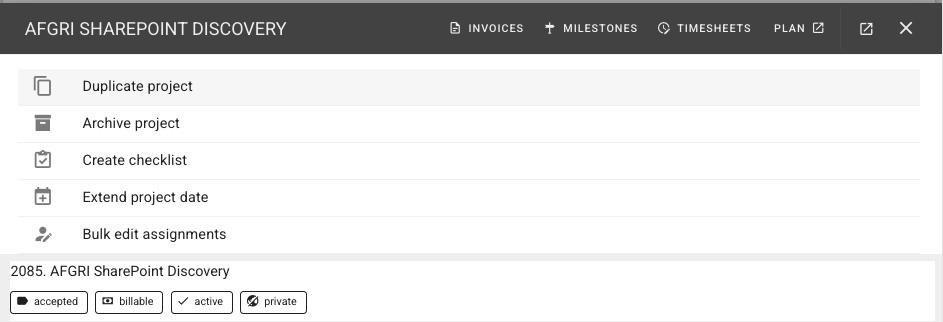
Example Menu
<template>

  <action-menu
    v-model="action"
    :actions="actions" size="x-small" >
    <v-card-title
      class="py-0 bg-grey-lighten-4 text-overline" >
      {{ title }}
    </v-card-title>
    <v-divider />
  </action-menu>

  <v-dialog
    v-model="dialog"
    v-if="action && action.id" >

    <component
      :is="action.component"
      v-if="action.component"
      v-bind="action.props" />

  </v-dialog>

</template>


<script setup >
import { useReactiveStore } from '@/composables/useReactiveStore';
import { defineProps, defineEmits, ref } from 'vue'
import ActionMenu from '../ActionMenu.vue'

// composeables:
// broadcast("employee", employee.id, employee)
const { broadcast} = useReactiveStore()

const emit = defineEmits(['update:modelValue', 'input'])

// props:
const props = defineProps({
  modelValue: { type: Object, required: true }
})

// data:
const dialog = ref(false)
const action = ref(null)
const title = ref('Employee Actions')

const actions = [
  {
    id: 'edit',
    title: 'Edit',
    icon: 'mdi-pencil',
    props: {},
    dialog: true,
    fetch: true
  },
]

</script>
Features
- Globally available menu automatically added to listitems and cards
- Customizable header and footer section can be used to add extra context and links
- Easy to use from anywhere, just execute:
appstore.setSelectedResource('resourceName', resourceInstance)- This will display the global context menu for
resourceNamewith the context of the activeresourceInstance
- This will display the global context menu for
- Injects the
resourceInstanceas themodelValuepassed to the registered component
Add an item to a menu
You will find the menu container at: src/components/actions/:resource/Menu.vue
Add a dialog item
A dialog item is a component that is included in the menu file itself and will be shown inline in a dialog
In the Menu.vue, on the actions computed value. e.g.:
{
    id: 'action_id',
    title: 'Display name',
    icon: 'mdi-icon-to-use',
    disabled: true/false, // or statement that evaluates to one or the other
    dialog: true, // show in a dialog
    fetch: true // if try, will fetch the item's detail page. e.g.: /api/:resource/:resourceId
},
If you're adding a dialog, typically, you will want to import the component responsible for performing your action, and then include it in Menu.vue dialog control - if the relevant action_id is selected:
<v-dialog v-model="dialog" :fullscreen="action.fullscreen" scrollable >
  ...

  <my-action
    v-if="action.id==='my-action'"
    v-model="resource"
    @changed="dialog=false"
    @close="dialog=false" />
</v-dialog>
Patterns
Passing static variables
Static variables can simply be passed in via props in useCommandPaletteRegistry
Passing dynamic variables
INFO
Dynamic variables are additional variables that can be set from the context at the moment that the component is launched
Dynamic variables can be set using dynamicProps in useCommandPaletteRegistry
Adding a resource to another resource
Sometimes you will want to add a child resource to an parent resouce.
For example: company.add_deal
The problem
Actions in useCommandPaletteRegistry are designed to be performed on a resource. So, if you call customer.add_deal, by default, the modelValue passed in will be a Customer instance, not a Deal.
If you are re-using a generic add/edit form (e.g.: AddDeal), it will expect to receive a modelValue that is the (in this case), a Deal - however, if we are calling it in the context of a Customer
Pattern 1: Create a wrapping component
This is the simplest solution:
- Create a Wrapper component, e.g.:
src/components/actions/AddDealToCompany.vue - Your wrapper will receive the Company as
modelValueand then create a pre-populated model to pass through to theAddDealcomponent
Example Wrapper container
- Here we create a wrapper component for the AddDeal component.
- We create a pre-populated deal object to pass into the child component
<template>
<v-card >
  <!-- <pre>{{ deal }}</pre> -->
  <add-deal-form expanded
    v-model="deal"
    @created="dealCreated" />
</v-card>
</template>

<script setup>
import { ref, onMounted } from 'vue'
import AddDealForm from '@/components/forms/deal/AddDealForm.vue'

const props = defineProps({
  modelValue: { type: Object, required: true }
})

const emit = defineEmits(['update:modelValue'])

const deal = ref({})

onMounted(() => {
  deal.value = {
    customer: props.modelValue.id
  }
})

function dealCreated(deal) {
  console.log('dealCreated', deal)
  emit('close')
}

</script>